GSoC 2026 Endterm - Plugin Modernizer Stats Visualization

Hello everyone,
This blog showcases the work done on the Plugin Modernizer Stats Visualization project during Google Summer of Code 2026. For a detailed description of the project, please refer to the project page.

About the Project
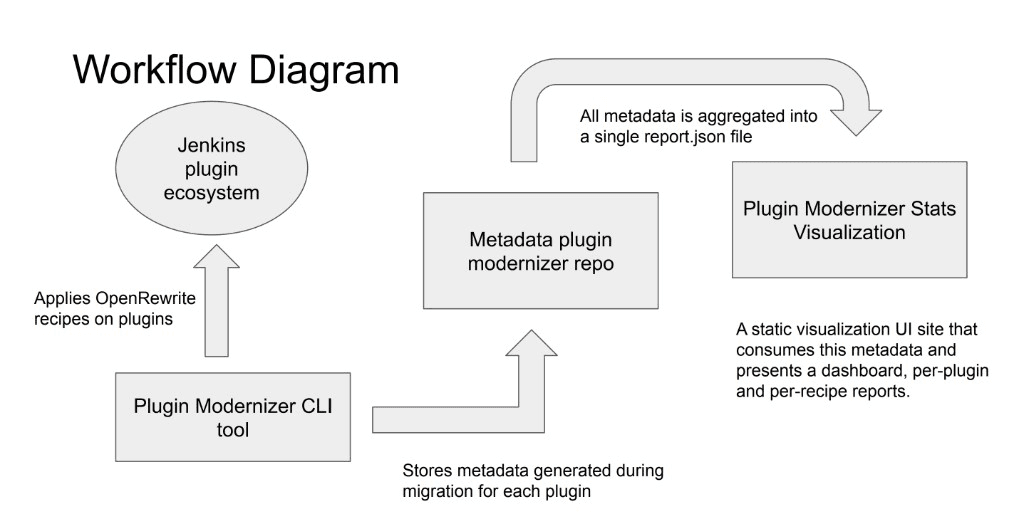
The Plugin Modernizer Tool automates the modernization of Jenkins plugins using OpenRewrite recipes, creating pull requests with the results. As part of GSoC 2025, a metadata repository was established that stores raw modernization metadata in JSON/CSV format.
My GSoC 2026 project, Plugin Modernizer Stats Visualization, builds a static visualization site that consumes this metadata, consolidates it into a structured format and presents dashboards alongside per-plugin and per-recipe report pages. The goal was to give plugin maintainers, modernizer authors, new contributors and the infra team a single place to understand modernization health at a glance without manually browsing hundreds of plugin directories.
The diagram below shows how the different pieces of the ecosystem fit together:
Phase 1
By the midterm, we accomplished the following milestones:
-
Data Pipeline (ETL): A GitHub Actions workflow in metadata-plugin-modernizer validates raw modernization data, runs a Python consolidation script to produce a single report.json and deploys it via GitHub Pages.
-
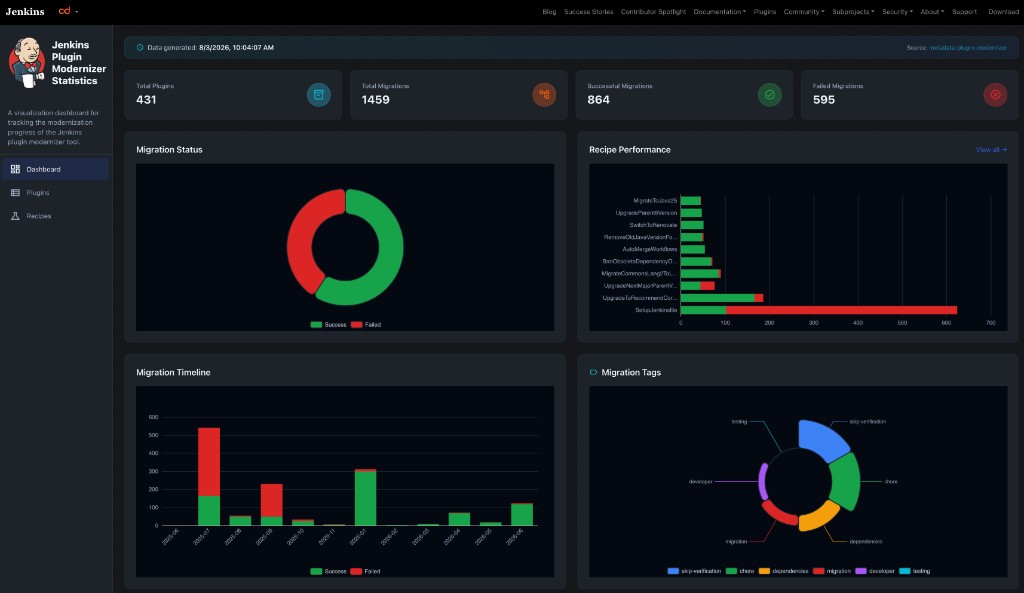
Dashboard (Home Page): Summary stat cards, migration status donut chart, recipe performance bar chart, migration timeline trend, and tag distribution visualization.
-
Plugin List Page: A searchable table of 400+ plugins with status badges, migration ratios, last-updated dates, and links to plugin pages and GitHub repositories.
Check out the live demo and my midterm blog post for more details on the first half of the coding period.
Phase 2
In the second half of GSoC, the focus shifted from foundational pages to drill-down reports, polish and production readiness. The result is a fully navigable site where users can move from a high-level overview down to individual plugins and recipes.
Dashboard
The home page brings together the key metrics from across the modernization effort : total plugins, migrations, successes and failures alongside charts that reveal trends over time and highlight which recipes need attention.
Plugin List Page
The plugin list page displays all plugins that have been processed by the Plugin Modernizer Tool. Each row shows the plugin name, overall migration status (All Passed, All Failed, Mostly Passed, Mostly Failed), the success-to-failure ratio, the last updated date and quick links to the plugin’s detail page and GitHub repository. The table is searchable and filterable, making it easy to find a specific plugin or scan for ones that need attention.
Per-Plugin Detail Pages
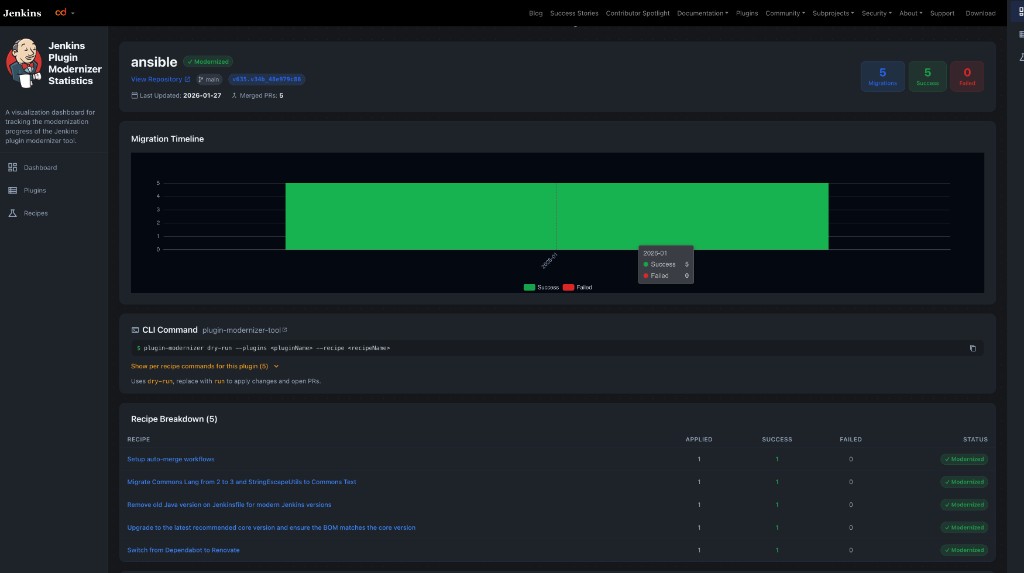
Clicking into any plugin opens a dedicated detail page with a complete picture of that plugin’s modernization history. For example, the page for the ansible plugin shows:
-
A header with the plugin’s overall status, repository link, branch, last updated date and merged PR count.
-
Summary stat cards for total migrations, successes and failures.
-
A migration timeline chart that visualizes when recipes were applied and whether they succeeded or failed.
-
A recipe breakdown table listing every recipe applied to the plugin, along with applied, success and failed counts and per-recipe status.
-
A PR history section with links to the pull requests generated by the modernizer.
-
A failed migrations table surfacing error details for any recipes that did not succeed.
Recipe List Page
The recipe list page displays all recipes that have been applied across the plugin ecosystem. Each row shows the recipe name, how many plugins it was applied to, the overall success rate and a link to the recipe’s detail page. This view helps recipe authors quickly identify which recipes are performing well and which ones may need fixes or improvements.
Per-Recipe Detail Pages
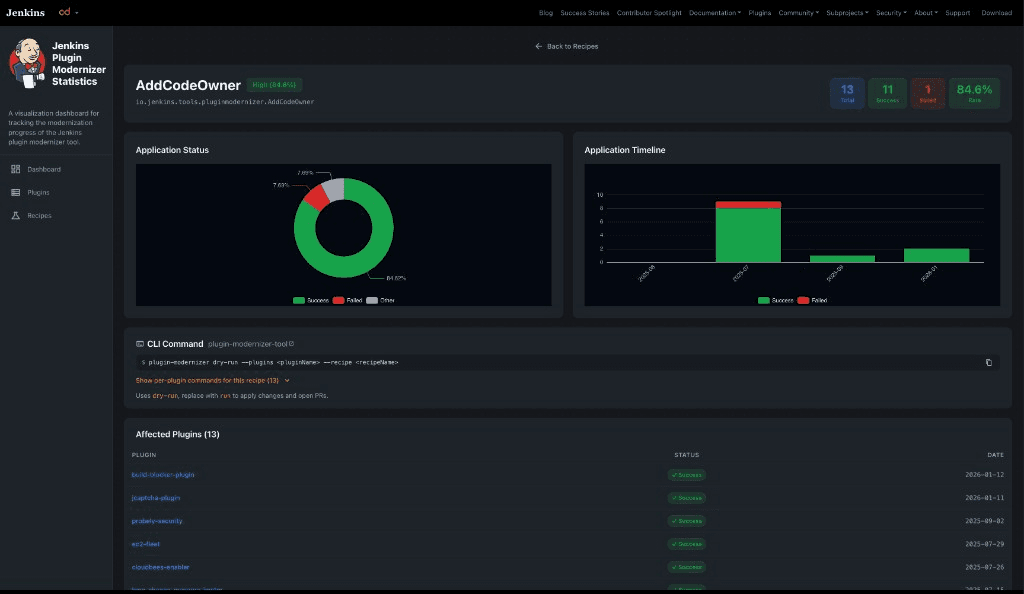
Each recipe has its own detail page with stats scoped to that recipe. For example, the page for the AddCodeOwner recipe shows:
-
A header with the recipe’s fully qualified name and overall success rate.
-
Summary stat cards for total applications, successes, failures and success rate percentage.
-
An application status donut chart breaking down success, failure and other outcomes.
-
An application timeline chart showing when the recipe was applied over time.
-
An affected plugins table listing every plugin the recipe was run against, along with per-plugin status and date.
Stretch Goal: CLI Command Snippets
As a stretch goal, I added copy-paste CLI command snippets on both the per-plugin and per-recipe detail pages.
These snippets show the exact plugin-modernizer command needed to run a dry-run (or apply) a recipe on a specific plugin, lowering the barrier for maintainers who want to reproduce or retry a modernization locally.
Users can expand a dropdown to see per-recipe commands for a given plugin, or per-plugin commands for a given recipe, and copy any command with a single click.
UI/UX, Theming and Reliability
Beyond the core pages, several improvements went into making the site production-ready:
-
Jenkins-aligned theming using jenkins-io-components for shared navbar and footer, with a color palette consistent with the Jenkins visual ecosystem.
-
Error boundaries and error pages for graceful handling of missing data, network failures and invalid routes.
-
Skeleton loaders on dashboard, list and detail pages so the UI feels responsive while data is being fetched.
Testing
The project now has 32 test files with 303 passing tests covering pages, components, hooks and utility functions using Vitest and Testing Library.
A GitHub Actions CI pipeline runs linting, formatting, build and test checks on every pull request.
The site is deployed automatically to GitHub Pages on every merge to the main branch.
Documentation
The repository README includes setup instructions, a description of the data flow and references to the related Plugin Modernizer and metadata repositories, making it straightforward for new contributors to get started.
Challenges and Learnings
Designing a consistent data model that could power both plugin-level and recipe-level views from a single report.json was one of the bigger technical challenges.
The consolidated report needed to be rich enough for detailed drill-down pages while remaining small enough to fetch quickly in the browser.
Working closely with my mentors on the schema in metadata-plugin-modernizer early on helped avoid rework later.
Performance was another consideration with 431 plugins and 21 recipes, list pages needed virtualization and careful chart rendering to stay smooth.
Using react-window for the plugin and recipe tables and lazy-loading chart data on detail pages kept the experience snappy even on slower connections.
Finally, coordinating changes across two repositories (metadata-plugin-modernizer for the ETL pipeline and plugin-modernizer-stats for the UI) taught me a lot about planning cross-repo work, writing clear PR descriptions and keeping both sides in sync through regular mentor syncs.
Next Steps
While the core deliverables are complete, the following areas represent the clearest next steps for making the modernization effort more targeted and effective:
Plugin Health Score Page
-
Goal: Add a dedicated page that displays a health score for each plugin, similar to the existing score on the Jenkins Plugin Index (e.g., ansible-tower health score).
-
Why it matters: Today, the stats site shows what happened during modernization — which recipes ran, which PRs were opened and whether they succeeded. A health score page would show where a plugin stands overall — surfacing gaps in documentation, dependencies, security advisories, adoption and other factors that affect maintainability.
-
Expected outcome: Plugin maintainers and contributors could open a single page, see a plugin’s health at a glance and immediately understand which modernization recipes would have the highest impact. This turns the stats site from a historical report into a prioritization tool helping the community focus modernization efforts on plugins that need it most.
AI-Assisted, Plugin-Specific Recipe Recommendations
-
Goal: Explore integrating AI technologies to analyze a plugin’s modernization history and recommend specific, plugin-level recipes tailored to that plugin’s current state.
-
Why it matters: Not every plugin needs the same set of recipes. Running all 21 recipes blindly is inefficient; some plugins may only need a Java version upgrade, while others need dependency migrations or CI workflow updates. By learning from patterns in the existing metadata (which recipes succeeded, which failed and in what order), an AI-assisted layer could suggest the most relevant next steps for each plugin.
-
Expected outcome: Instead of a maintainer guessing which recipes to apply, the tool would surface a ranked list of recommended recipes with reasoning, improving the accuracy and effectiveness of the modernization process and reducing failed migration attempts.
Other Enhancements
-
Add deeper filtering and sorting options on list pages (e.g., filter plugins by tag or recipe).
-
Explore embedding or linking the stats from stats.jenkins.io for broader discoverability.
-
Add export options (CSV/JSON) for plugin and recipe reports.
-
Continue expanding test coverage as new features are added and the dataset grows beyond 431 plugins.
Acknowledgements
A huge thank you to my mentors, Valentin Delaye, Kris Stern, Sridhar Sivakumar and Raunak Madan, for their constant support, refining the approach and timely reviews throughout the journey. They conducted sync meetings twice a week, were always reachable on Slack and actively reviewed my pull requests — that made all the difference.
I’d also like to thank the organization admins for always checking in and offering help.
This project builds on the work started by Sridhar Sivakumar in GSoC 2024, Using OpenRewrite Recipes for Plugin Modernization, and improved by Raunak Madan in GSoC 2025, Improving Plugin Modernizer. I’m grateful to continue that lineage.
Finally, thank you to the Jenkins community for being welcoming and supportive throughout GSoC 2026.
About the author