GSoC 2026 Midterm: AI Chatbot to Guide User Workflow


Hi everyone 👋, I’m Daniele, the Google Summer of Code 2026 contributor currently working on the AI Chatbot to Guide User Workflow plugin.
The coding phase began over a month ago, and I have a lot to tell you about the progress made. During this first half of the GSoC, I’ve been focusing on Data Storage, Hybrid Retrieval, the Frontend UI and the Jenkins Controller Proxy.
Data Storage
My first step was to implement different data retrieval systems, which get information from four different sources: Jenkins Docs, Plugin Docs, Reddit, and Discourse.
I’ve collected all the documentation for Jenkins and its plugins, which will be useful both for configuring and troubleshooting the system. I’ve also collected all the most helpful discussions on Reddit and Discourse that contain possible solutions to Jenkins common problems.
For Discourse, I use its API endpoints to retrieve topics, while for the other three sources, I use a scraping approach.
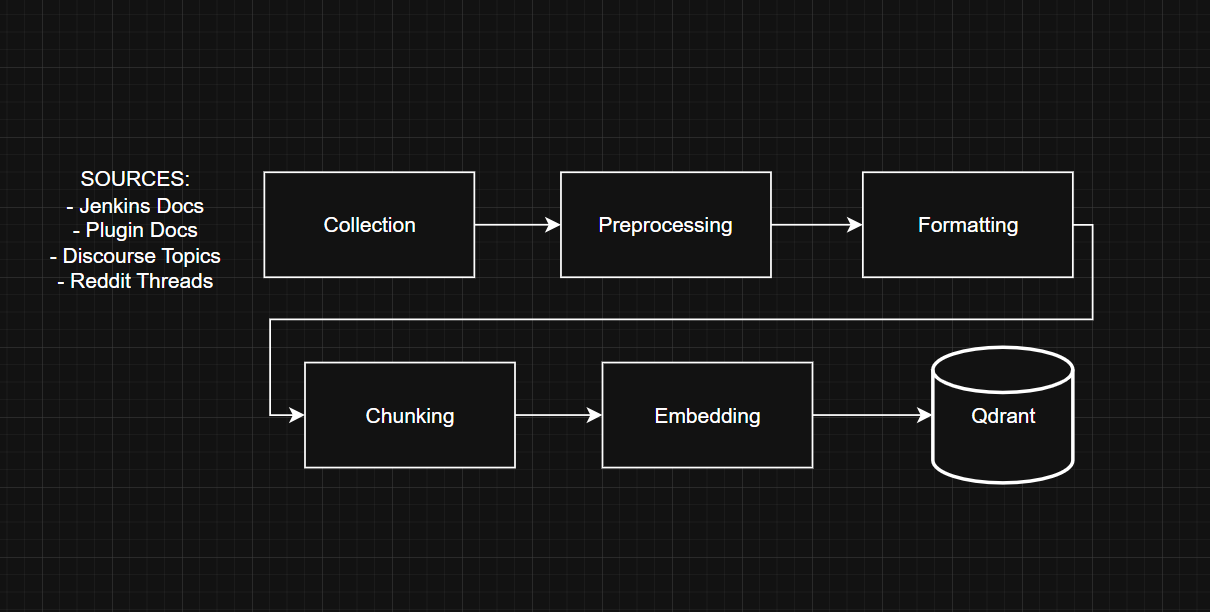
The data follows a pipeline where it’s processed, formatted, chunked, embedded, and finally stored in Qdrant (a vector database). I chose to use Qdrant because it offers native support for hybrid retrieval, which is exactly what our agent will need to search for useful information and provide the user with the most relevant answer possible.
Hybrid Retrieval
I’m currently using a 384-dimensional embedding model from HuggingFace to vectorize and retrieve semantically chunks (model name: all-MiniLM-L6-v2).
For sparse retrieval, I use BM25. These two models compose the Hybrid Retriever, which will be used to retrieve data from both the four sources (Jenkins documentation, etc.) and the Jenkins context data. Using this type of retrieval, we’ll perform both semantic and keyword searches. Each chunk stored in VectorDB has its own metadata, which allows us to narrow down the set of chunks to search.
Frontend UI
The frontend user interface is built entirely with React + Vite, Typescript, and the MUI component library.
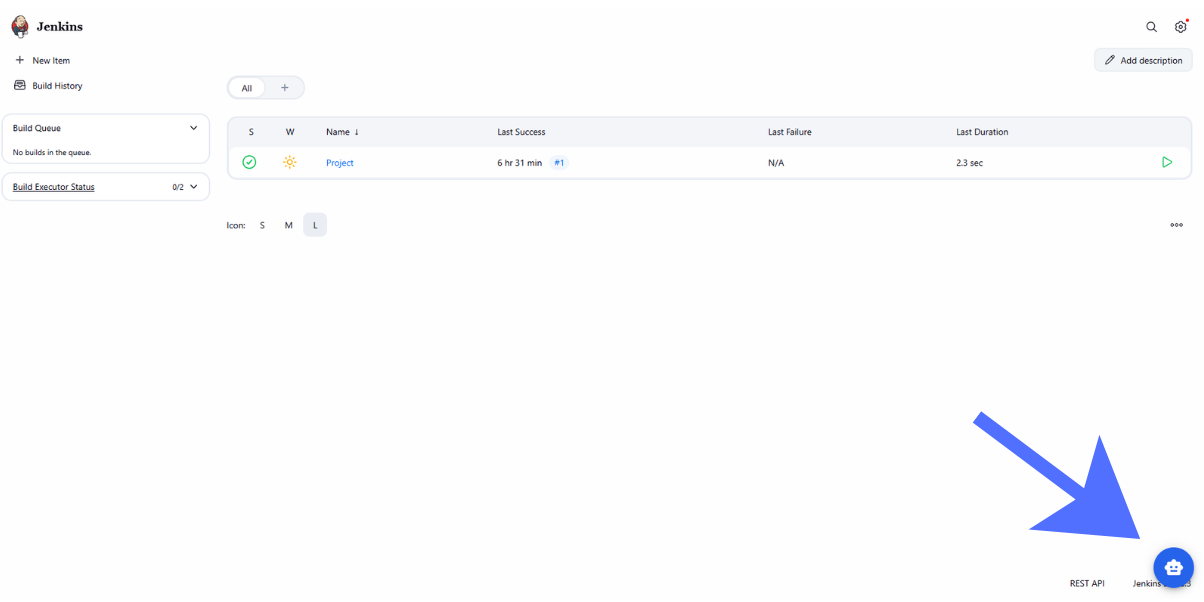
The user interface appears as a side panel that can be opened by clicking a simple overlay button at the bottom right of the Jenkins screen.
By interacting with the user interface, you can create a new conversation with the chatbot, continue a previous conversation, or upload the current Jenkins context.
The Jenkins context that may be uploaded includes: current screen name, job config.xml file, Jenkins pipeline, failed run logs, and more.
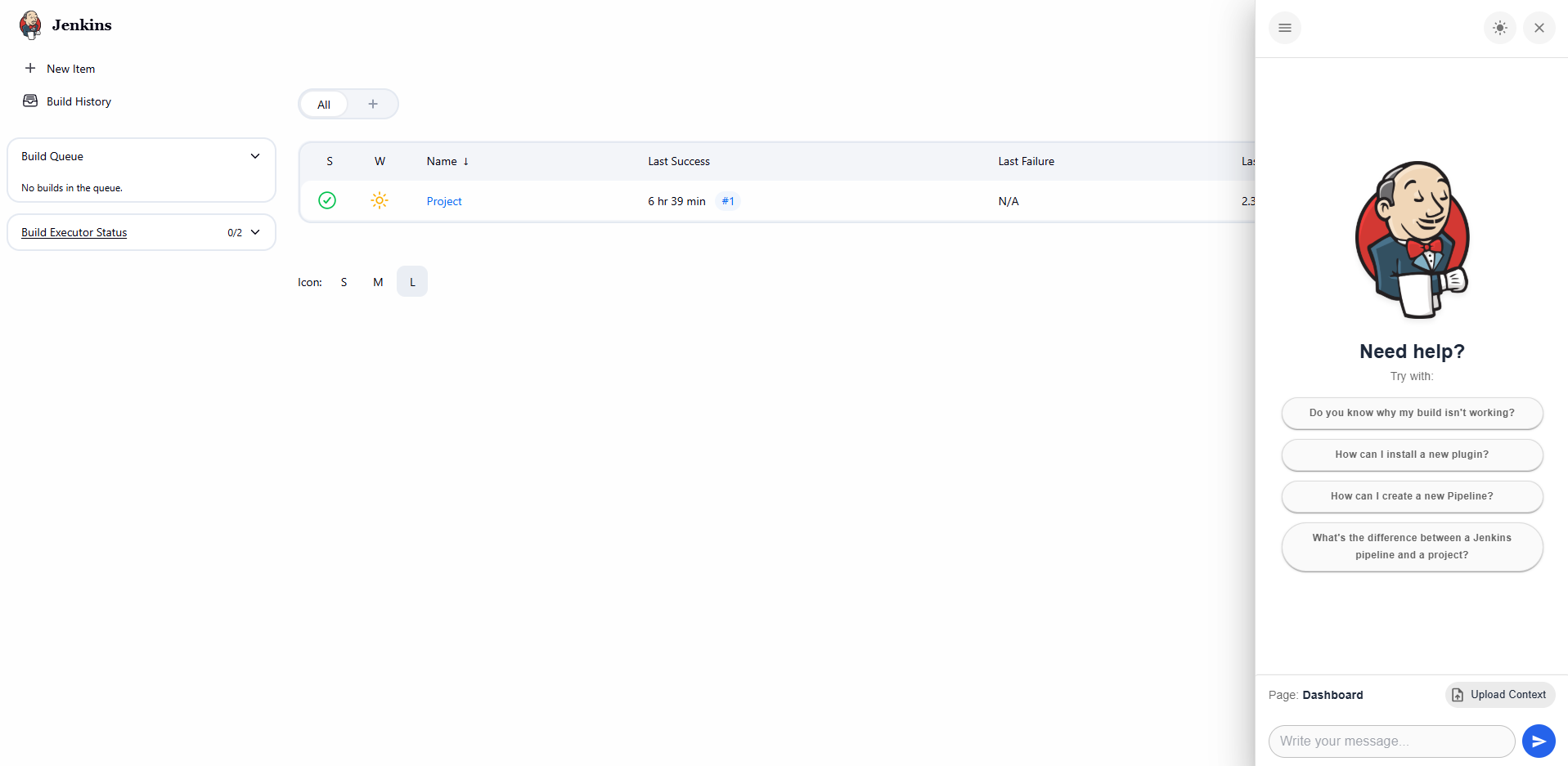
All chat histories are stored permanently in a PostgreSQL instance and can be accessed by clicking a button at the top left of the panel.
The user interface supports both light and dark mode, which can be toggled using a button at the top right of the panel.
Jenkins Controller Proxy
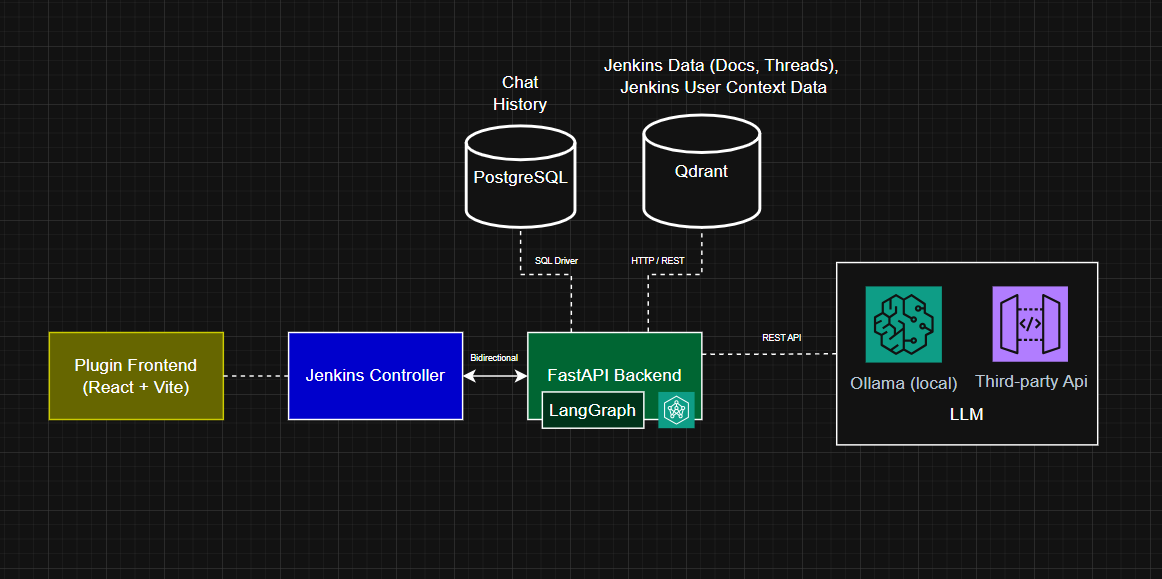
Regarding communication between the frontend and backend, every request from React passes through the Jenkins Controller, which acts as a proxy and forwards each request to the FastAPI backend.
This is possible thanks to a Stapler Endpoint in the Jenkins Controller, which verifies that each request includes a Jenkins CRSF Token and then uses a secret key to generate a valid temporary JWT, which will be attached as a header when the received request is forwarded to the backend.
Jenkins stores both the backend URL and the secret symmetric key used to generate the JWT (which will be stored in the backend).
It can be modified from Manage Jenkins > System > AI Chatbot Settings.
This image shows the architecture after all the changes made during this first half of the Coding Period.
My experience so far
Over the past few weeks, I had the opportunity to work alongside my mentors, and it has been an incredibly valuable experience. They have been very supportive throughout the development process, providing insightful feedback and practical suggestions that have helped me improve both the project and my approach to working to complex problems.
Overall, I am very satisfied with the progress made so far. The project is moving forward steadily, and I feel that the guidance and encouragement from my mentors and the rest of the Jenkins community have played a significant role in making this experience both productive and enjoyable.
What’s next?
I’m currently working on Jenkins context retrieval, which is the part that retrieves, vectorizes, and stores the context of the Jenkins screen focused by the user.
The next steps will involve creating the Agent’s core logic and tools to gather more information to provide the user with the most accurate response possible.
Finally, I will implement the RAGAS evaluation, which will test and evaluate the entire Agent system.
I can’t wait to participate in this second part of GSoC and to continue working with this incredible community!
See you soon!
About the author