Nested layout for pipeline graph view

We’re happy to announce that the most requested feature for the Pipeline Graph View plugin (and for Blue Ocean before it) is finally here: a new layout that renders nested pipelines in full detail.
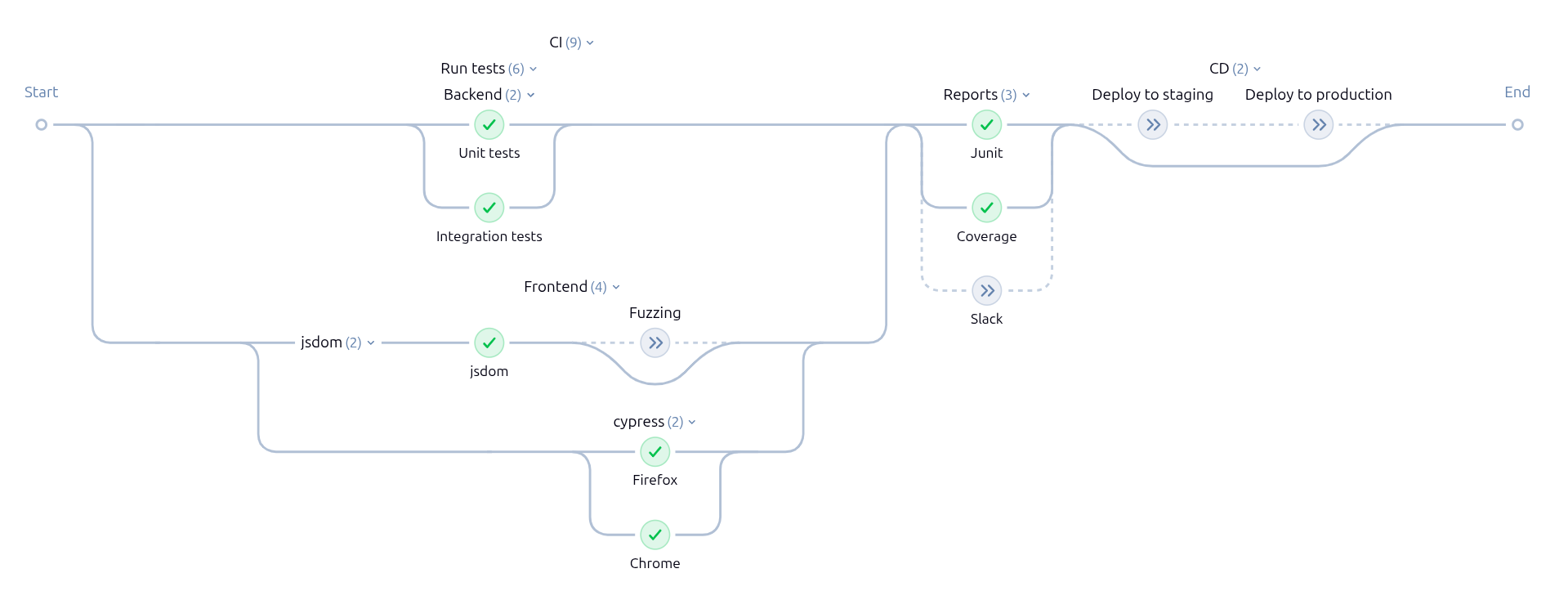
Pipelines with nested parallel stages (like CI → Run tests → Frontend → cypress above) or nested sequential stages (like CD above) benefit from this change the most.
Upgrade the Pipeline Graph View plugin to version 918.vf572523124f2 or later to use the new layout.
Previously, a fixed column-based layout was used for displaying the pipeline graph. It supported one level of parallel nesting and the display of nested sequential stages was confusing.
Click to see a rendering of the same run with the old layout.

CI / CD) are displayed as regular nodes.
The parallel test stages are flattened into a sequential-looking flow.
The parallel stages for cypress are not displayed.
The new graph-based layout supports arbitrary nesting. Similar to parallel stages, it uses labels above the nodes for nested sequential stages. These labels stack up with increasing nesting. The nodes of nested stages are horizontally aligned to bring order into complex pipelines.
Nested skipped stages (like Fuzzing in the screenshot) can now use the same rendering as skipped stages at the top level (like Deploy to staging). The connections to parallel skipped stages (like Slack) are shown as dotted lines.
Thanks to the existing separation between the layout engine and the rendering of nodes/labels, the nested layout can reuse most of the existing implementation for rendering the graph.
Due to the vast flexibility of Jenkins pipelines, bugs from unhandled edge cases may still exist in the new implementation. We are collecting feedback in this GitHub issue: Nested parallel feedback #1286. If you find an issue, add your feedback there with a screenshot and an example pipeline demonstrating the issue.
Many thanks to the early adopters for finding and reporting multiple edge cases already.
You can compare the rendering of your own pipelines by toggling between ?nestedLayout=1 (new layout, default in plugin version 918+) and ?nestedLayout=0 (old layout) in your browser address bar. See the GitHub issue for more information.
We plan to remove the old layout in a future release.
About the author