AI Chatbot to Guide User Workflow (GSoC 2026)


Hello everyone, I’m Daniele, an Italian computer science student, and this summer I’ll be working on the AI Chatbot to Guide User Workflow plugin during GSoC 2026.
I started contributing to Jenkins many months ago, and after following the official communication channels, I noticed how difficult it can be for beginners to understand the functionality of complex software like Jenkins. My goal is to create a plugin that’s useful for Jenkins beginners, but can also help every developer debug their own failed Jenkins executions, reducing the time spent fixing a specific error and maximizing productivity.
The plugin will allow you to connect the current application context to give the chatbot access to the current screen, logs, and pipeline configuration files.
The agent will be able to access data from a VectorDB to get information about documentation, plugin documentation, and even discussions on Discourse and Reddit. Using all this data, it will be possible to provide the most accurate response possible.
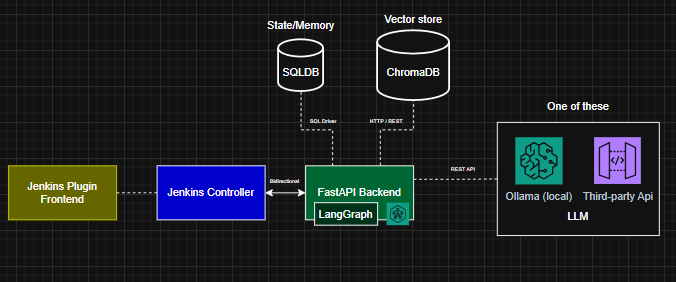
Here you can find a summary of the Plugin specifications.
Plugin architecture
-
Jenkins Plugin Frontend: Sidebar created in React + Vite Frontend. Here it is possible to see the chat history, pick an older chat or also start a new one. It also presents a specific button which lets the user make the decision of attaching the current context.
-
Jenkins Controller: The Jenkins Controller is fundamental as it is the bridge between the frontend and the FastAPI backend, it has the task to validate the authentication and decide if the user can access the backend or not.
-
FastAPI Backend: The backend is the core part of the plugin, I decide to opt with FastAPI as it is a very solid framework for building backend applications. The heart of the agent will be LangGraph which will manage the different reasoning states. The agent will have at his disposal different tools which will be useful to get more info as possible in order to give the most accurate response back to the user.
-
ChromaDB: In the vector db data different types of data will be stored as vectors, such as Jenkins Docs, Jenkins Plugins Docs, Discourse and Reddit Discussions.
-
LLM: choose a local open source LLM hosted with Ollama or a third party api.
The architecture is designed to be modular so that the user is free to decide where to host each component, on the same machine or on different ones.
Agent tools
Here you can find an example list of the tools that the agent will be able to use.
Hybrid Retrieval (VectorDB + BM25 Indexer)
-
Search Build Logs: Search in the logs of the build (Stored in RAM)
-
Search Jenkins Docs: Search in the Jenkins Documentation
-
Search Plugin Docs: Search in the Jenkins Plugins Documentation
-
Search Discussion: Search in the Reddit and Discourse Discussions
Deterministic
-
Get Workspace Tree: Get the tree of the workspace
-
Get Workspace File: Get a specific file of the workspace
-
Get Job File: Get the Job file (config.xml, build.xml, jenkinsfile)
-
Get Diff File: Get the diff of a specific file
Here you can find the link of the repository of the plugin → link:github url[AI Chatbot to Guide User Workflow Repository]
I’m very excited to create a plugin which can help all the Jenkins users and I would also be really happy to have your feedback.
Talk soon!
About the author