Introducing the Batch Control Plugin
Many Jenkins controllers do not build software. They run nightly settlements, data loads and reconciliation scripts on a timer, the way a batch scheduler would.
On those controllers the scheduled run is rarely the problem.
The manual one is.
A vendor file arrives late, so someone opens the job, changes BUSINESS_DATE and presses Build Now.
A colleague is given Item/Configure for one fix, and keeps it because nobody takes it back.
Both are easy to do and easy to forget.
When someone later asks who re-ran the job, with which parameters, and who agreed to it, the answer sits in a build record that may already have been rotated out.
The Batch Control Plugin was created for that situation.
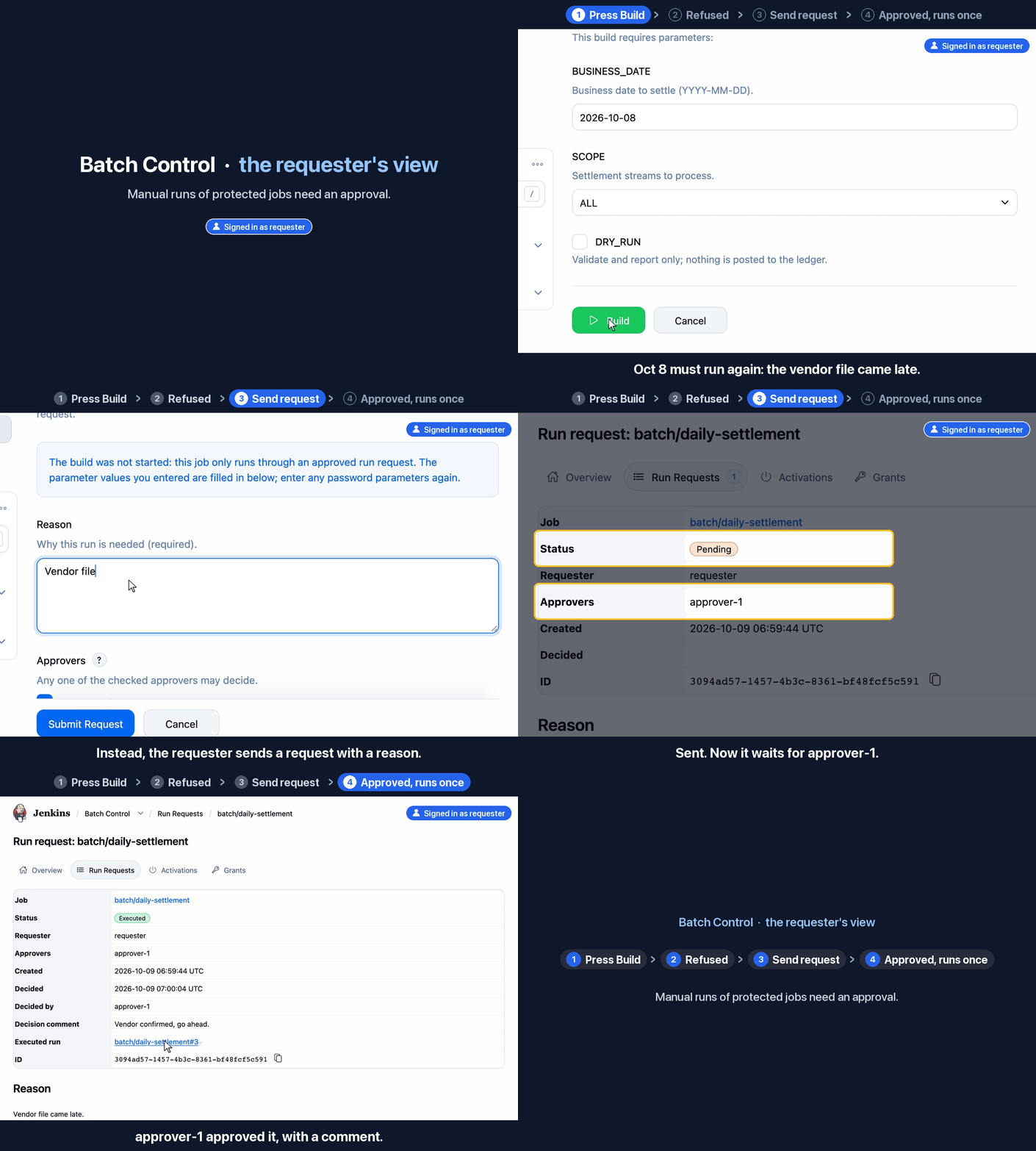
The requester’s view: Build is refused, the same run goes out as a request, and it runs once after approver-1 approves it.
What it provides
Batch Control adds two controls, and an administrator turns each one on separately. Installing the plugin changes nothing until then.
Run control.
On a job with Require approval to run checked, a person can no longer start the job directly.
Build Now, the build and buildWithParameters REST endpoints, jenkins-cli build and Pipeline Replay are refused when the build enters the queue.
The job offers Request Run instead: its own parameter form, plus a reason and the approvers to ask.
On approval the plugin queues the build once, with exactly the submitted values.
The parameters cannot be edited after approval, the approval cannot be used twice, and the requester cannot approve their own request.
Timers, upstream triggers, SCM triggers and webhooks keep working. The one exception is a job created after run control was turned on: it does not run unattended until an approver has activated it, and its Block cron (timer) triggers and Block upstream triggers switches start checked. Jobs that existed when the plugin was installed count as activated, so existing schedules do not stop.
Change control.
A user without Item/Configure on a job can request a permission window instead: one job or folder, some combination of CREATE, CONFIGURE and DELETE, a duration and a reason.
Once approved, the window adds those permissions for that item only and closes by itself when the time is up.
Expiry is a clock comparison at every permission check, so there is no revocation step, and an expired window stays closed across a restart.
Change control works through Batch Control variants of the Matrix Authorization Strategy and the Role-based Authorization Strategy, so existing matrix entries and role assignments are kept.
History.
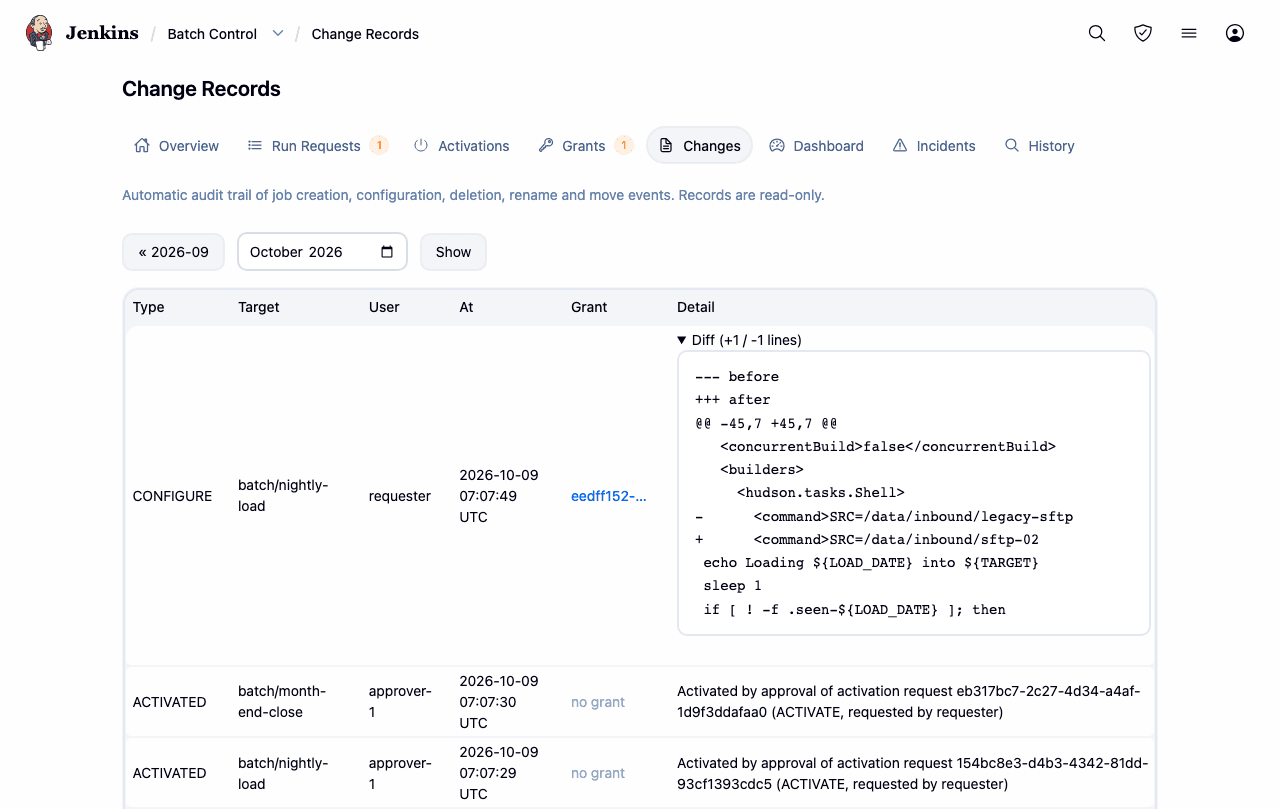
Whenever either control is on, runs, requests, decisions, configuration changes and failures are recorded under $JENKINS_HOME/batch-control/: runs and configuration changes in monthly append-only files, requests and incidents in a file each.
Deleting or rotating builds does not touch them.
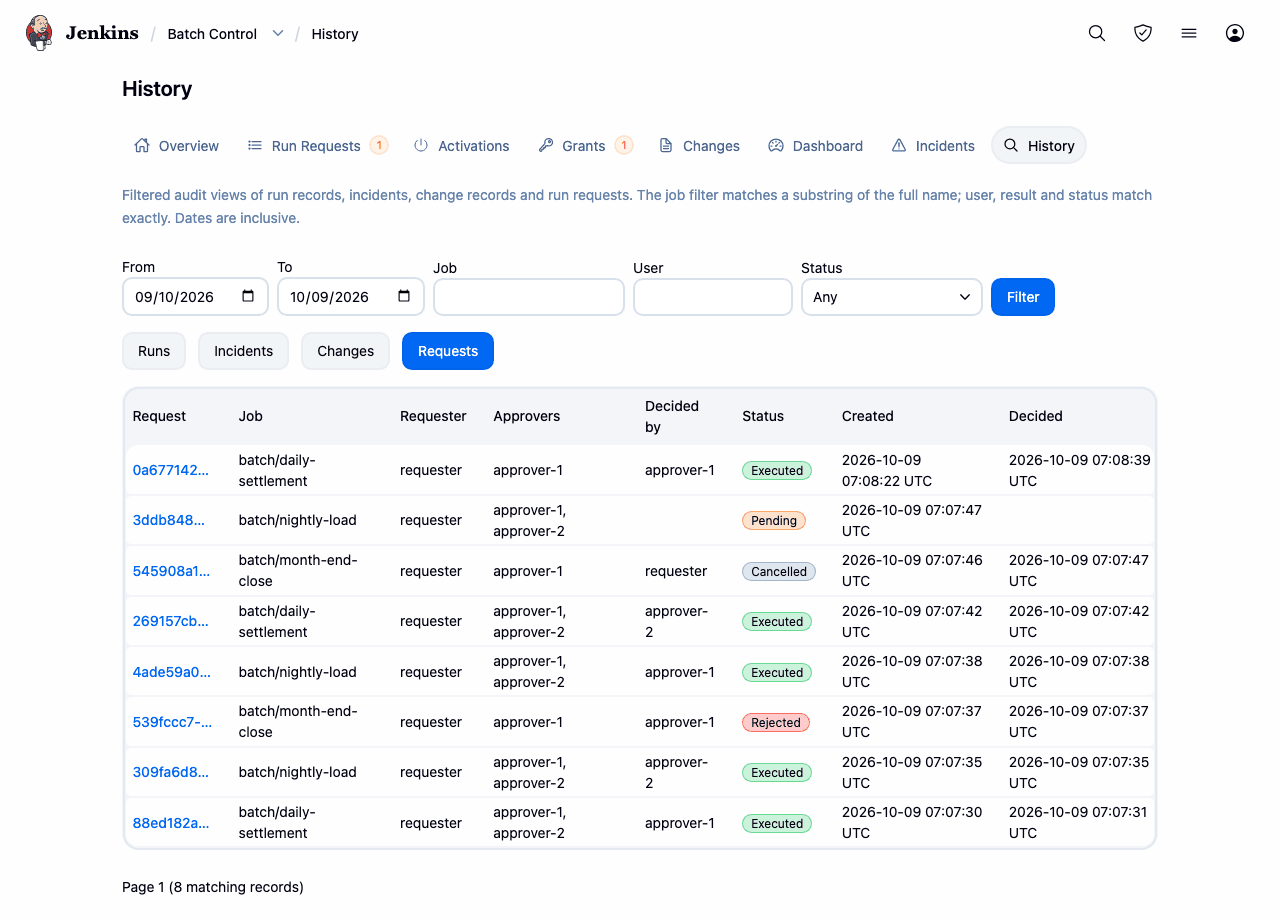
The History screen filters them by period, job, user, result and status, and exports each view as CSV.
Failed and unstable builds open an incident with the last 100 console lines. A re-run from an incident is again a request, carrying the failed build’s parameters; when some of them can no longer be recovered, it opens the Request Run form with the other non-secret values filled in.
An example
The settlement for 8 October has to run again because a vendor’s file arrived late.
The requester opens Request Run on the job, fills in the parameters and the reason, and picks an approver, as in the recording above.
The approver opens the request from Batch Control → Run Requests. The page shows the parameters as submitted, then one decision area with an optional comment and the Approve and Reject buttons, and the job’s recent runs below. A rejection needs a comment and is final, so the plugin asks for confirmation before sending it.
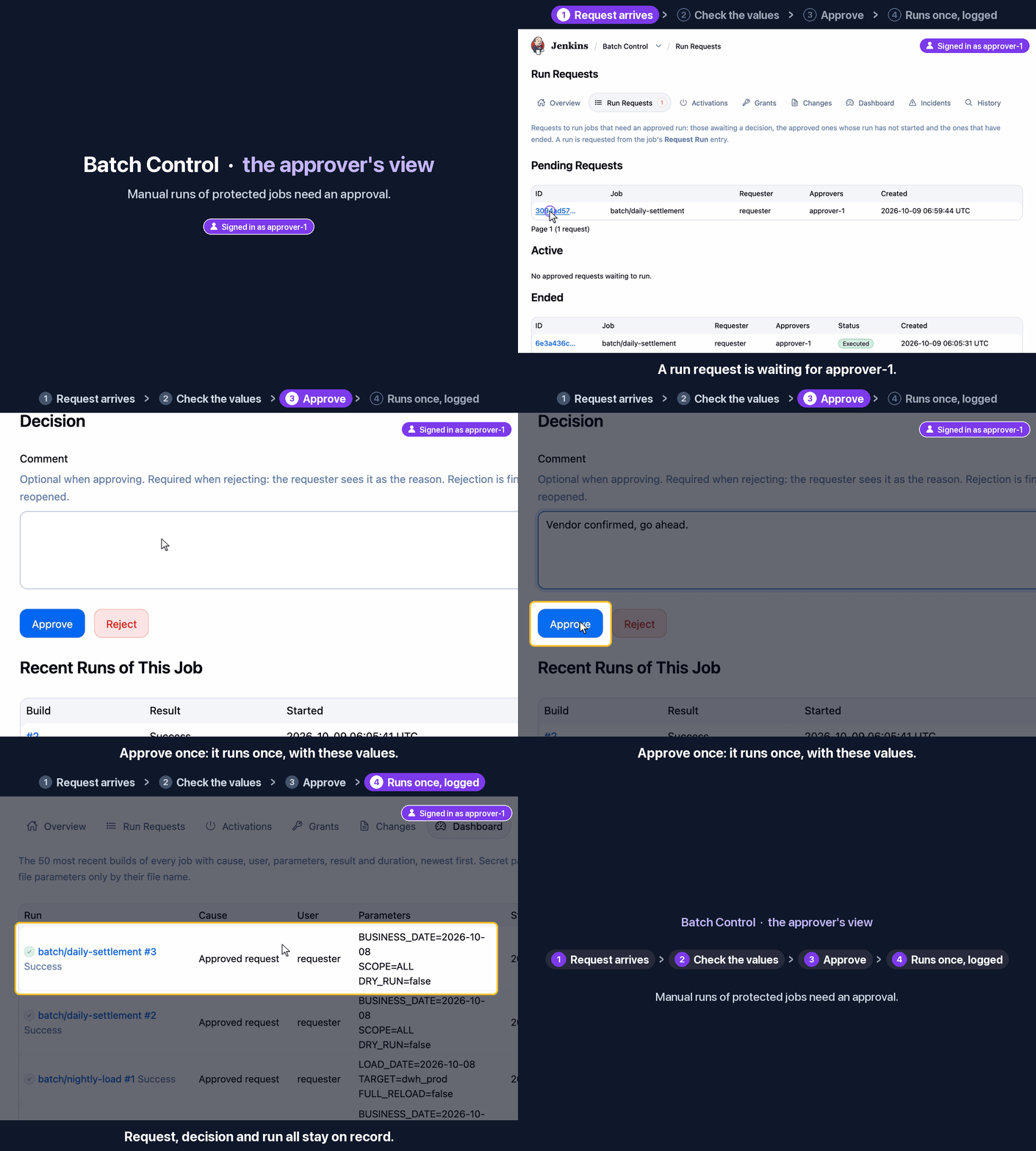
The approver’s view: the values as submitted, one decision, and the run it starts.
Anyone with BatchControl/ViewHistory can later find the request in History, with who asked, who decided and the build it started:
A configuration change made through a permission window ends up in Change Records, with its diff and the id of the window it was made under:
Why the scope is narrow
Batch Control is intentionally narrow in scope.
It does not replace a batch scheduler, and it does not try to be a general approval engine. It puts a request and a designated approver in front of a manual run, puts an end time on a permission, and keeps the record somewhere a build rotation cannot reach.
Some things are outside that scope on purpose, and some are not done yet:
-
Administrators are recorded, not stopped. An administrator can switch a control off, and by default may approve their own request; clearing Allow administrators to approve their own requests turns that off. Each of those actions is recorded.
-
There is no way to edit or delete individual records, only the retention cleanup (24 months by default), and direct edits on disk are not detected.
-
There is no REST API yet, and no sequential multi-stage approval: the first designated approver to act decides.
Compared with what is already available:
-
The Pipeline
inputstep pauses a build that has already started, works for Pipeline jobs only, and keeps its record in the build. Batch Control gates the start of a run, for any job type. -
Audit Trail and Job Configuration History record what happened. Neither puts a request, an approver and a permission that ends by itself in front of the record.
The complete list of limitations is in LIMITATIONS.md.
Getting started
To look around before touching a real controller, the repository has a Docker Compose demo.
Run docker compose up in its demo directory and open http://localhost:8080/.
It starts a throwaway Jenkins with both controls on, a requester, an approver and two protected jobs; the logins and a short walkthrough are in demo/README.md.
On your own controller, Batch Control needs Jenkins 2.568.3 or newer on Java 21 or 25, and Matrix Authorization Strategy or Role-based Authorization Strategy.
-
Install Batch Control from Manage Jenkins → Plugins.
-
In Manage Jenkins → System → Batch Control, check Enable run control, list the approvers and save.
-
Give requesters
BatchControl/Requestand approversBatchControl/Approve, both withOverall/ReadandItem/Read. -
On a job, check Require approval to run.
The same settings can come from Configuration as Code:
unclassified:
  batchControl:
    runControlEnabled: true
    changeControlEnabled: true
    approvers:
      - approver-1
      - approver-2
    allowAdminSelfApproval: false
For permission windows, also check Enable change control, switch to the Batch Control variant of your authorization strategy, and give requesters BatchControl/RequestGrant.
If you use the global Matrix-based security, review the permissions saved on jobs, folders and agents first: the Batch Control variant is project-based, so those start to apply.
The user guide has the full setup.
How it was built
I started Batch Control on my own on 20 September, with most of the code written by Claude Code agents: 1,295 of the 1,559 commits carry a Claude co-author line.
The specification and the design decisions are mine.
For example, the first design locked a new job with two fields in its config.xml.
Creating the job already needed a permission window, and a CONFIGURE window could clear those same fields, so one approval was enough to let a new job run unattended.
Before the first release, activation moved out of the job configuration and can now change only through an approved activation request.
Because most of the code is AI-written, verification does not rely on the agent that wrote it:
-
1,513 tests, written by a separate agent that works from the specification and never reads the implementation;
-
an end-to-end suite that runs on every pull request that changes the code, against a real Jenkins in Docker, driven by Playwright. It includes an upgrade from the released plugin, which checks that existing records and schedules survive, and runs with each control switched off, which check that Jenkins behaves as it did before;
-
the jenkinsci hosting review.
The security review reports in the repository were written by AI agents too. They are not a human audit.
Batch Control has also started to receive outside contributions. The confirmation step before a rejection came from a pull request by r1shabhsharma05, who also fixed the Windows CI runs. Small, self-contained tasks are labelled good first issue, and I review every pull request myself.
Learn more
-
Plugin site: Batch Control Plugin
-
Source code: jenkinsci/batch-control-plugin
-
User guide: USER-GUIDE.md
-
Local demo: demo/README.md
-
Good first issues: good first issue
If you run batch work on Jenkins, I would like to hear whether the approval flow matches how your team signs off a manual run. Feedback and contributions are welcome.