Introducing Artifact Explorer: A Modern Interactive File Browser for Jenkins
Archiving build artifacts is one of the most fundamental capabilities of Jenkins. Whether you are generating test reports, code coverage summaries, deployment manifests, release binaries, or packaging distributions, inspecting what a build produced is a regular part of everyday development.
However, the classic artifact browsing interface has remained virtually unchanged for over a decade. Navigating complex directory hierarchies has historically meant clicking through monochrome plain-text listings, waiting on a full page reload per directory, and downloading files locally just to inspect a JSON payload or read a test report.
Today, we are excited to introduce Artifact Explorer—a drop-in plugin that brings modern, high-performance file browsing and inline inspection directly to Jenkins.
Classic Jenkins vs. Artifact Explorer
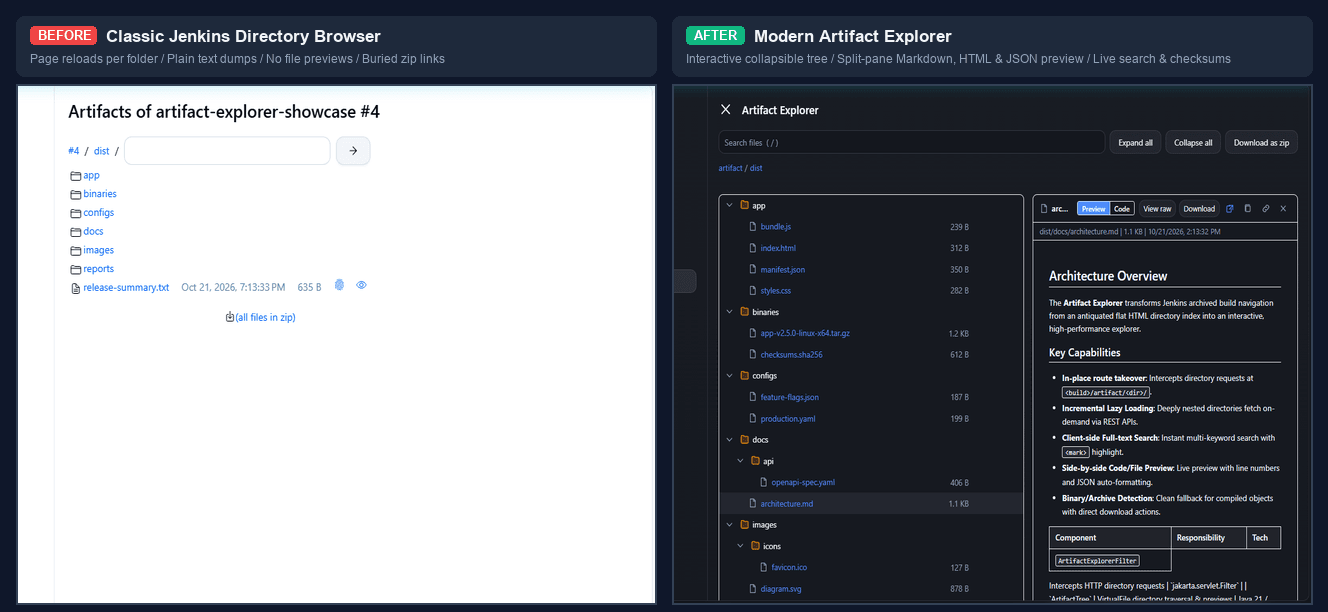
| Capability | Classic Jenkins | Artifact Explorer |
|---|---|---|
Directory Navigation |
Full-page browser reload per folder click |
Instant collapsible tree with keyboard navigation and lazy-loading |
File Inspection |
Monochrome unformatted text dumps or local download |
Split-pane live previews for Markdown, HTML (sandboxed), JSON, YAML, CSV, and images |
Search & Discovery |
None (manual browser search on single pages) |
Instant client-side search across all artifacts with highlight matching |
Build Summaries |
Monolithic flat table displacing logs and stage views |
Compact overview card with instant Tree / Flat view toggle |
Integrity & Provenance |
External CLI or script verification required |
One-click on-demand SHA-256 calculation and manifest verification |
Pipeline Changes |
Standard |
Zero changes required (100% backward compatible) |
Key Capabilities
1. Interactive Split-Pane Explorer
Artifact Explorer replaces the standard directory browser at <build>/artifact/ with an interactive, split-pane workspace designed for developer speed:
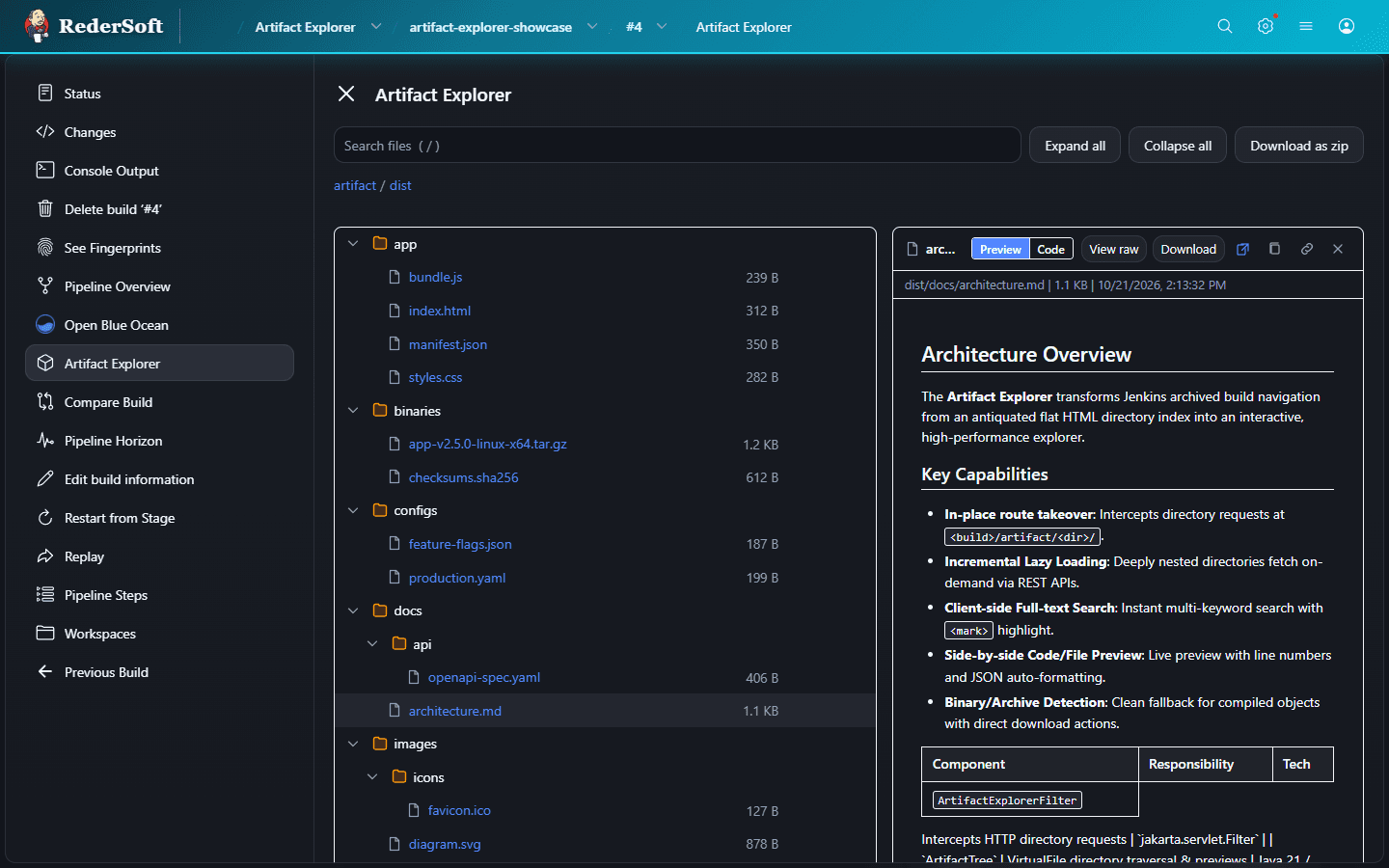
Instead of static folder links, Artifact Explorer renders an interactive hierarchical tree with lazy loading:
-
Markdown (
.md): Renders formatted headings, tables, blockquotes, and code blocks with an instant toggle between preview and raw code. -
Code and Configurations: Zero-dependency syntax coloration for JSON, YAML, XML, properties files, and shell scripts. JSON payloads feature automatic indentation and pretty-printing.
-
Structured Data: CSV and TSV files format into clean, interactive tables.
-
HTML Artifacts: Bundled web reports render within a secure, sandboxed frame.
-
Images: Visual preview for PNG, SVG, JPEG, and GIF assets.
2. Modernized Build Overview Cards
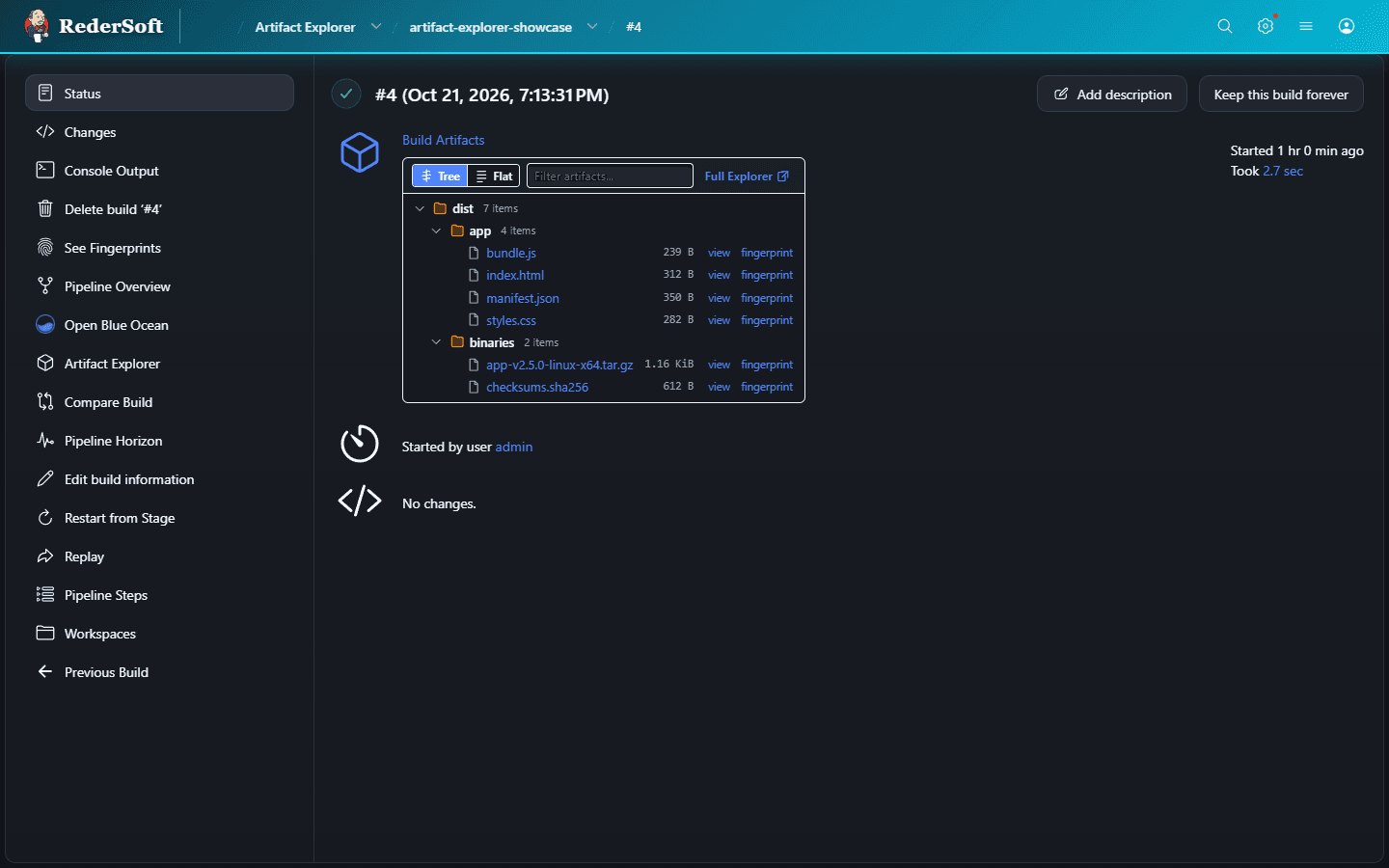
On Job and Build overview pages, the plugin replaces the monolithic flat list with a compact overview card:
-
Segmented View Switcher: Instantly toggle between nested
[ Tree ]hierarchy and clean[ Flat ]file listing. -
Extension Filter Pills: Click filter pills (
[ All ],[ .json ],[ .log ]) to immediately isolate file types. -
Direct Explorer Link: Jump directly into the full Artifact Explorer with a single click.
3. Cryptographic SHA-256 Verifier & Provenance
Verifying artifact integrity usually requires downloading large files locally to your workstation and running command-line hashing tools. Artifact Explorer allows you to trigger on-demand SHA-256 calculations directly through the web interface—computed on the Jenkins controller without requiring local downloads:
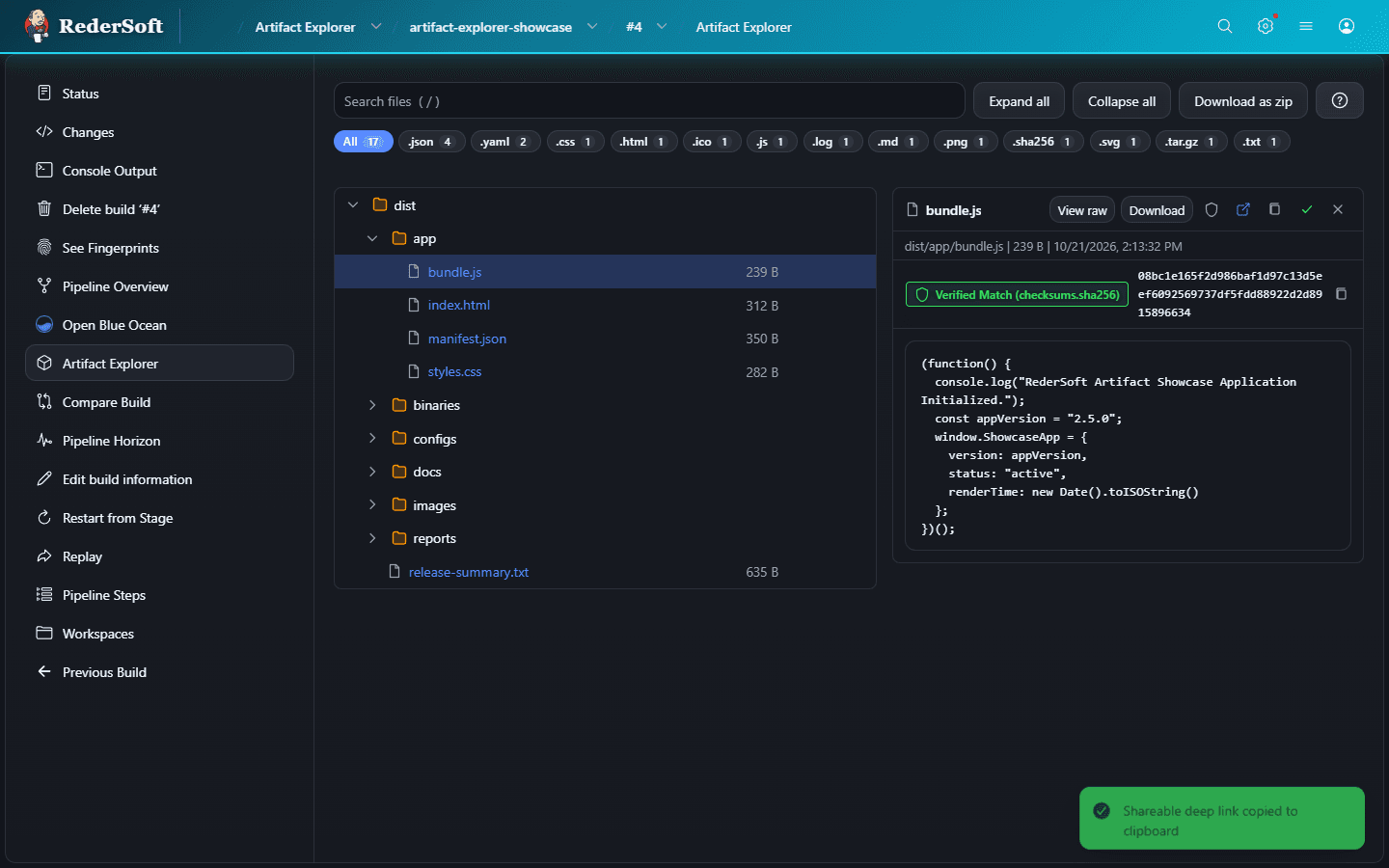
Clicking the integrity badge or pressing s computes the file’s SHA-256 digest on the controller. When an archived checksum manifest (such as *.sha256 or checksums.txt) is present among the build artifacts, the interface automatically validates the computed hash against the manifest and displays a verified status badge.
4. Selective Subfolder Zip Downloads
Need to grab a single subdirectory out of a complex multi-gigabyte build? Hovering over any folder in the hierarchy reveals a direct download button to download only that specific directory as a compressed .zip archive.
5. Power-User Ergonomics
For users who prefer keyboard navigation, Artifact Explorer includes built-in shortcuts:
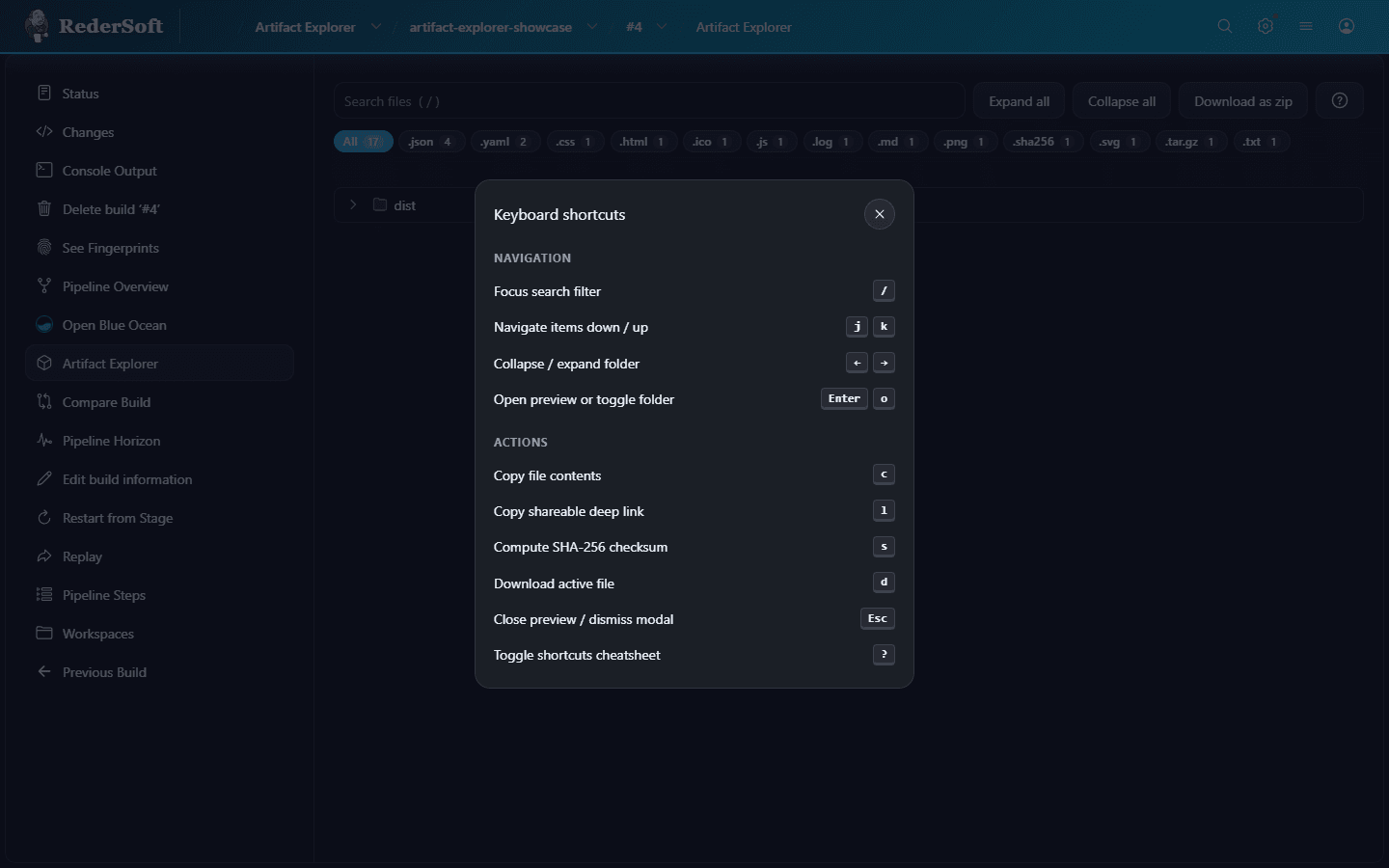
Pressing ? displays the shortcut cheatsheet:
* j / k: Move up and down the file tree.
* Enter: Open folder or trigger file preview.
* s: Calculate SHA-256 checksum.
* /: Focus the search bar.
* Esc: Dismiss preview or search.
Zero Pipeline Configuration Required
One of our primary design goals was complete backward compatibility. You do not need to rewrite your Jenkinsfiles or reconfigure existing jobs.
Installation
-
Go to Manage Jenkins → Plugins.
-
Select the Available plugins tab.
-
Search for Artifact Explorer.
-
Install the plugin and restart Jenkins.
Any pipeline using the standard archiveArtifacts step will automatically display the modernized interface on its builds:
pipeline {
    agent any
    stages {
        stage('Build & Test') {
            steps {
                sh 'make dist'
                // Optional: generate a checksum manifest to enable automated SHA-256 verification
                sh "find dist -type f ! -name 'checksums.sha256' -exec sha256sum {} + > dist/checksums.sha256"
                archiveArtifacts artifacts: 'dist/**', fingerprint: true
            }
        }
    }
}