Plugin of the Month – September 2026: ORAS Artifact Manager

Welcome back to the Plugin of the Month series, where we highlight useful and impactful tools from the Jenkins ecosystem.
This September, we’re featuring a plugin that rethinks where your build artifacts actually live: the ORAS Artifact Manager Plugin.
What is the ORAS Artifact Manager Plugin?
By default, Jenkins stores archived artifacts and stashes on the controller’s local disk (or on whatever storage backend an artifact manager plugin provides). The ORAS Artifact Manager Plugin takes a different approach: it stores them in any OCI-compliant registry, using ORAS (OCI Registry As Storage).
OCI registries were originally built to distribute container images, but the OCI ecosystem has since standardized on storing arbitrary content — SBOMs, Helm charts, signatures, and now Jenkins build artifacts — as regular OCI artifacts.
Once configured, every archived file and every stash produced by your jobs is pushed to the registry of your choice instead of piling up on the Jenkins controller’s disk:
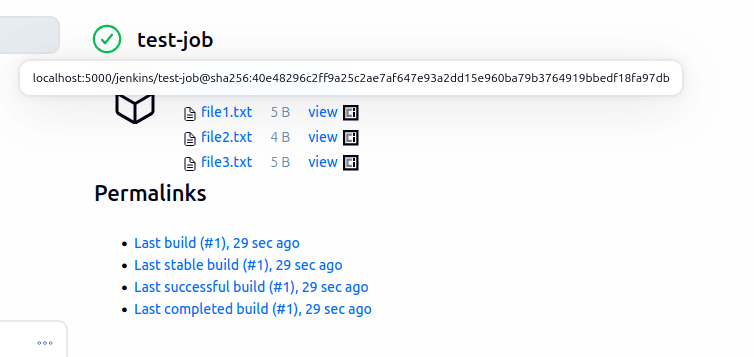
From the build page, artifacts look exactly like artifacts always have — you don’t lose the familiar Jenkins UX, you just change where the bytes are stored.
Built on ORAS and the ORAS Java SDK

The plugin doesn’t talk to registries directly. It relies on a dedicated ORAS Java API Jenkins plugin, which in turn bundles the official ORAS Java SDK.
This layering matters:
-
ORAS defines the client tooling and conventions for pushing/pulling arbitrary artifacts to OCI registries, on top of the OCI Distribution and OCI Image spec.
-
The ORAS Java SDK is a CNCF ORAS sub-project library that implements those conventions natively in Java.
-
The ORAS Artifact Manager Plugin builds Jenkins' artifact and stash storage model on top of that SDK.
Because the underlying protocol is just OCI, any registry that speaks the OCI Distribution Spec works: Docker Registry, Harbor, Zot, GitHub Container Registry, Artifactory, and others.
How Artifacts Are Structured in the Registry
This is the part that’s genuinely interesting if you’re curious about OCI internals, and not just "another storage backend."
The plugin maps each Jenkins job to an OCI repository, sanitizing the name in the process (for example folder/My Job becomes folder/my-job).
For every build, it pushes a build root artifact, tagged with the build number, which acts as the anchor for everything produced during that build.
Every archived file is then pushed as its own single-layer OCI manifest, linked back to that root artifact using the OCI 1.1 subject field — the same mechanism used for referrers like signatures or SBOMs on container images.
Stashes follow a similar pattern, stored as tagged, gzip-compressed layers.
The two custom media types you’ll see on the manifests are:
-
application/vnd.io.jenkins.oras-artifact-manager.build.v1+jsonfor the build root artifact -
application/vnd.io.jenkins.oras-artifact-manager.file.v1+jsonfor each individual archived file
Because files reference the build root through subject instead of a hand-rolled index file, the plugin can discover every artifact for a build with a single call to the registry’s referrers API.
You can see this structure yourself with the oras CLI.
Given a build root tagged 13, asking the registry what refers to it:
$ oras discover -o tree localhost:5000/test:13

localhost:5000/test:13
└── application/vnd.io.jenkins.oras-artifact-manager.file.v1+json
    ├── sha256:2c26b46b68ffc68ff99b453c1d30413413422d706483bfa0f98a5e886266e7a
    ├── sha256:9e58a1ce0ff0aad2adf3f18e6c92e58a17d3f4b5c6a7891234567890abcdef0
    └── sha256:d1f2c3a4b5e6d7c8a9b0c1d2e3f4a5b6c7d8e9f0a1b2c3d4e5f6a7b8c9d0e1f2
Each of those digests is an independent manifest carrying a single layer (the file’s content) plus annotations that preserve the metadata Jenkins cares about — the archived path, the creation timestamp, and so on. A registry UI that understands OCI referrers, like Zot, will show exactly that relationship when you inspect the build root artifact:
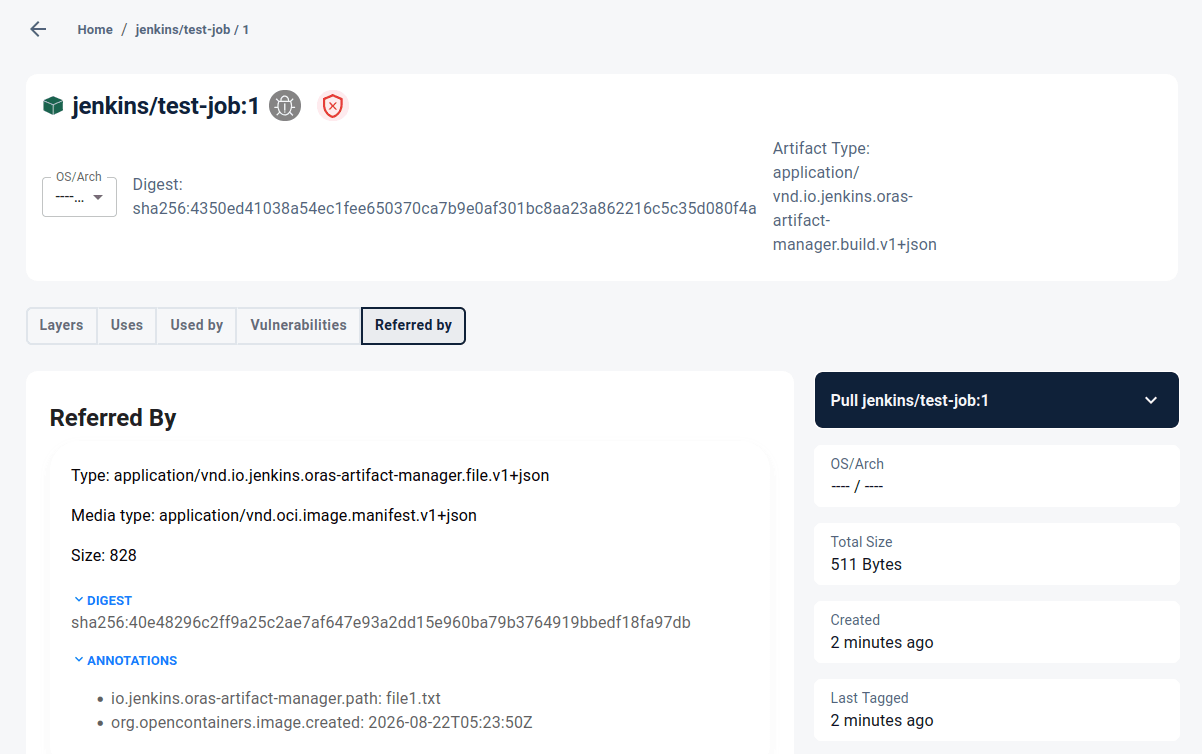
Notice the annotations: io.jenkins.oras-artifact-manager.path tells you which archived file this manifest corresponds to, and standard OCI annotations like org.opencontainers.image.created come along for free.
Worth Keeping in Mind
The plugin is still in beta, and so is the underlying ORAS Java SDK — APIs on both sides may still change before things settle. If you’re evaluating it, start with non-critical jobs, keep an eye on the GitHub repository for updates, and report anything unexpected through its issue tracker.
Looking Ahead
If your Jenkins controllers are drowning in archived artifacts, or you already run an OCI registry for your container images and would rather not maintain a second storage system just for build outputs, the ORAS Artifact Manager Plugin is worth a look.
Stay tuned for next month’s Plugin of the Month, and feel free to suggest plugins you’d like to see featured!
About the author