Plugin of the Month – May 2026: Coverage Plugin

Welcome back to the Plugin of the Month series, where we highlight useful and impactful plugins from the Jenkins ecosystem.
For May 2026, we’re featuring the Coverage Plugin.
Quality assurance is a pillar of modern CI/CD. Knowing how much of your code is actually tested—and how effectively those tests find bugs is crucial for maintaining a healthy codebase. This month, we are highlighting the Coverage Plugin, a comprehensive solution for collecting, aggregating, and visualizing code and mutation coverage reports in Jenkins.
What is the Coverage Plugin?
The Coverage Plugin is the modern successor to several older, format-specific coverage plugins. Instead of installing a different plugin for every language in your stack, the Coverage Plugin provides a unified object model and a sleek UI to handle a wide variety of report formats.
Whether you are measuring line coverage with JaCoCo or mutation density with PIT, this plugin brings all that data into a single, high-level overview within your Jenkins dashboard.
Supported Formats
One of the strongest selling points of this plugin is its versatility. Out of the box, it supports an extensive list of report formats across various ecosystems:
-
Java: JaCoCo, OpenClover, JUnit, and PIT (Mutation Coverage).
-
Node: Cobertura
-
Go: Go Coverage results.
-
C#/.NET: OpenCover, NUnit
-
Embedded/Safety Critical: VectorCAST (including MC/DC, Function, and Function Call coverage).
-
Testing Frameworks: JUnit, NUnit, and XUnit.
-
Static Analysis: PMD software metrics (via a patched version of PMD).
Key Features
1. Unified Visualization
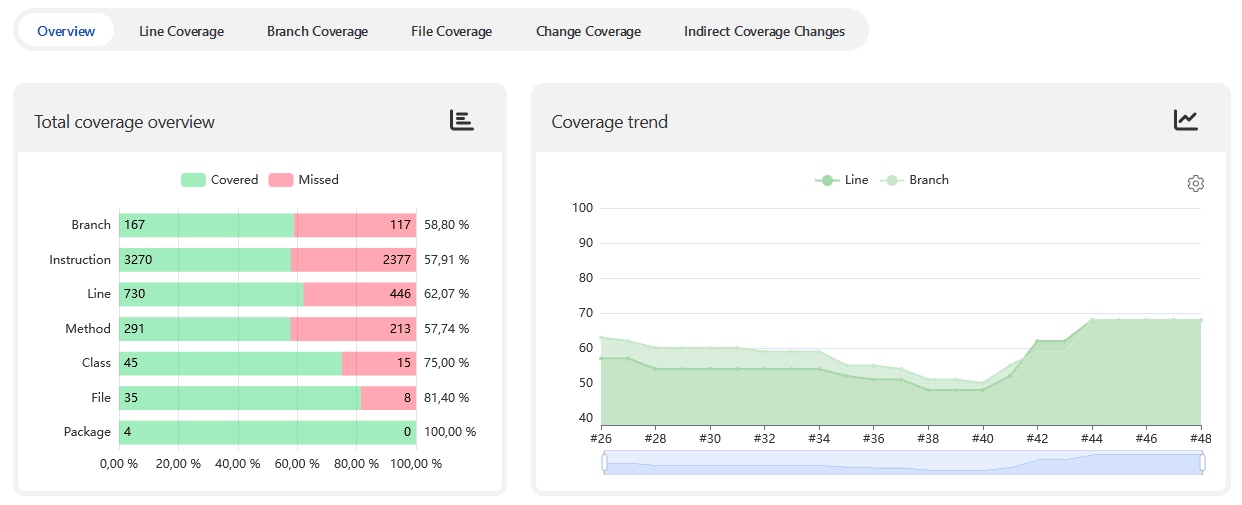
The plugin provides beautiful, interactive charts that track coverage trends over time. You can see at a glance whether your team is improving their test suite or if technical debt is creeping in.
2. Detailed Source Code View
It doesn’t just show percentages. You can drill down into specific files to see exactly which lines of code are covered (green) and which are missed (red), allowing developers to pinpoint gaps without leaving the Jenkins UI.
Getting Started in a Pipeline
Integrating the Coverage Plugin into your Jenkinsfile is straightforward.
Here is a simple snippet for a Java project with Maven using JaCoCo:
pipeline {
  agent any
  stages {
    stage('Test') {
      steps {
        // Run your tests (e.g. Maven with JaCoCo)
        sh './mvnw clean verify'
      }
    }
    post {
      always {
        // Record coverage results
        recordCoverage(tools: [[parser: 'JACOCO', pattern: '/target/site/jacoco/jacoco.xml']])
      }
    }
  }
}
Contribute to the Ecosystem
The Jenkins community thrives on contribution. If your favorite coverage tool is not yet supported, the Coverage Plugin is built on a highly extensible Coverage Model. The maintainers welcome pull requests to add new parsers and features.
Explore the plugin today on the Jenkins Plugin Site and start improving your project’s transparency and quality!
About the author
I started contributing regularly in 2019, with a focus on improving quality. I’m also keeping up with some older plugins that are still really popular, like the Thin Backup Plugin and the Job Configuration History Plugin. The community helped me to bring these back up to standard and I learned a lot along the way. Furthermore, I use these lessons to make regular improvements to the developer documentation.
In my day job, I’m a solution architect in a central team that provides Jenkins and DevOps consulting within a big automotive and industrial company.